Enterprise FAQ Bot: Build a Customer Support Assistant with Nbility + Dify
Article 15 in the AI Agent hands-on series: use Dify Knowledge, Chatflow, and an OpenAI-compatible model endpoint to build a grounded enterprise FAQ bot with citations, escalation, and cost control.
Many teams start AI customer support by pasting product manuals, help-center pages, and policy text directly into prompts. It may work for a demo, but it usually breaks down in production: the context window is limited, policies change, and the model may invent confident answers when it lacks evidence.
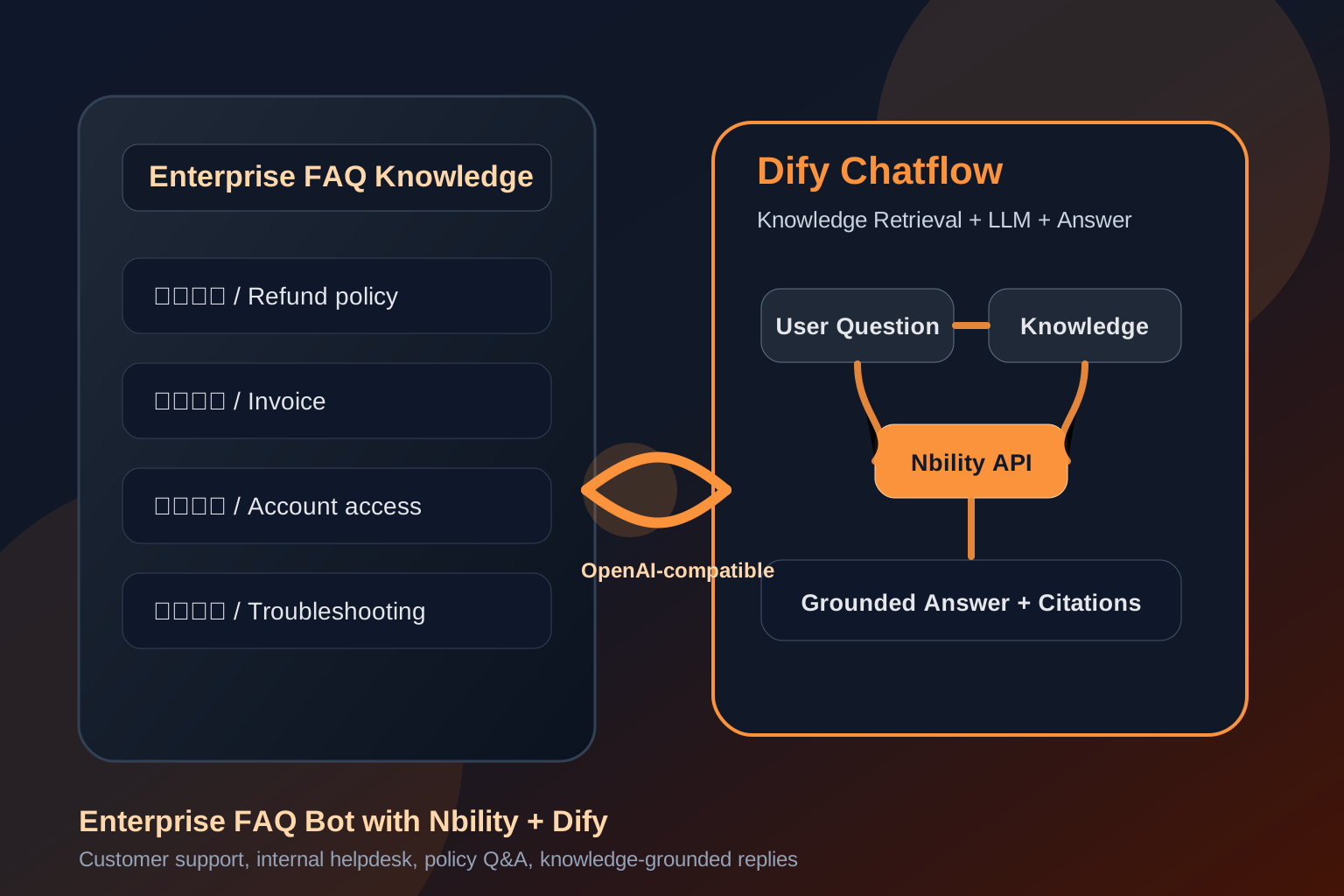
A more reliable setup is to let Dify handle the knowledge base, Chatflow, and publishing layer, while Nbility provides the OpenAI-compatible model API. The application layer manages workflow, the knowledge base provides facts, and the model generates the final answer.
This guide walks through a practical enterprise FAQ bot: preparing source material, configuring the model provider, building Dify Knowledge retrieval, writing a bounded support prompt, testing with an evaluation set, and controlling cost.
An FAQ Bot Is Not an Omniscient Support Agent
An enterprise FAQ bot is best suited for questions such as:
- Product usage: where a feature is and how it works;
- Account and access: activation, permissions, reset flows;
- Pricing and plans: plan differences, billing rules, invoices;
- Support policies: refunds, SLA, escalation;
- Internal helpdesk: IT, HR, admin, and policy Q&A.
It is not ideal for directly answering:
- Real-time order status, balance, or contract state;
- Legal, medical, financial, or compliance-sensitive conclusions;
- Complaints requiring human judgment;
- Questions where the documents provide no evidence.
The goal is not to make the bot answer everything. The goal is: answer when there is evidence, say so when evidence is missing, and escalate when the situation requires a human.
Recommended Architecture
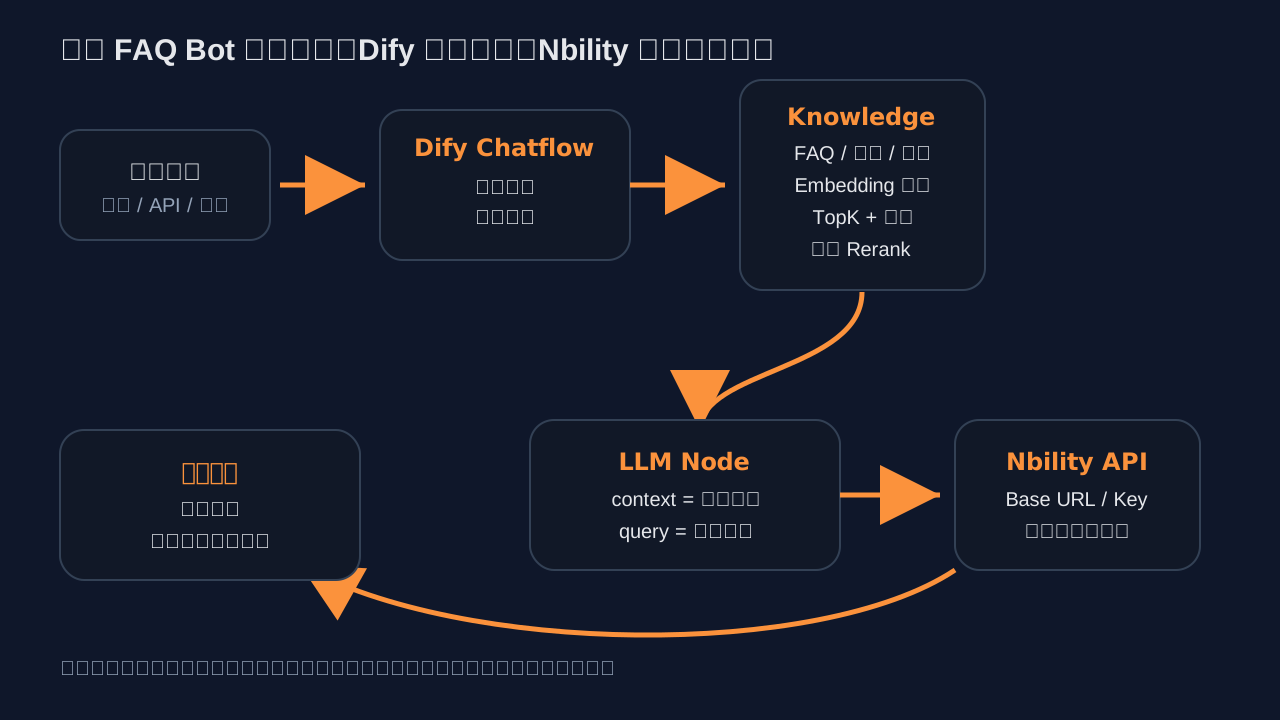
A reliable FAQ bot usually follows this chain:
User question
  -> Dify Chatflow
  -> Knowledge Retrieval over enterprise documents
  -> LLM Node generates a grounded answer
  -> Answer Node returns response and citations
  -> Escalate to human / ticket when needed
Dify's official customer-service tutorial emphasizes that the core of a knowledge base is retrieval, not the LLM. The model makes the answer readable; the knowledge base provides the factual grounding.
Prerequisites
You need four things:
- A Dify workspace: Dify Cloud or self-hosted Dify;
- A model endpoint: this guide uses Nbility through an OpenAI-compatible API;
- Enterprise FAQ or help-center documents;
- A test set: at least 20 common questions, 10 boundary questions, and 5 escalation cases.
For self-hosting Dify, the official quick start recommends Docker Compose. The docs state that Docker Compose 2.24.0+ is required, and Linux deployments need Docker 19.03+.
git clone https://github.com/langgenius/dify.git
cd dify/docker
cp .env.example .env
docker compose up -d
Then verify containers:
docker compose ps
For a first FAQ bot experiment, Dify Cloud or an existing test environment is usually faster. Move to self-hosting once the workflow is validated.
Step 1: Configure the Model Provider in Dify
Open Dify:
Settings -> Model Providers
Dify model providers are configured at the workspace level and power all applications in the workspace. Only workspace admins or owners can configure custom providers.
If your Dify version uses the Marketplace plugin flow, install or enable:
OpenAI-API-compatible
The Dify Marketplace page describes this plugin as a way to connect model providers compatible with the OpenAI API standard. Its configuration includes Type, Name, API Key, URL, completion settings, context and token limits, streaming, and vision options.
For Nbility, the important OpenAI-compatible settings are:
Base URL: https://api.nbility.dev/v1
API Key:  [REDACTED]
Model:    Any model available in your account, such as gpt-4o, gpt-5, or another enabled model
In Dify's OpenAI-compatible provider, the setup is usually:
Type: LLM
Model Name: your model name
API Key: [REDACTED]
API endpoint URL: https://api.nbility.dev/v1
Context size / Max tokens: set according to model capability
Streaming: recommended for support UX
Common pitfalls:
- Some tools call the field
Base URL; others call itAPI endpoint URL. - Most OpenAI-compatible applications expect the
/v1path. If an app automatically appends/v1, usehttps://api.nbility.devinstead.
Step 2: Prepare the Enterprise FAQ Knowledge Base
Do not upload a messy pile of documents first. A support bot fails when the answer exists but cannot be retrieved, or when outdated policies compete with current policies.
A better FAQ source looks like this:
# Refund Policy

## How long after purchase can a user request a refund?
Applies to new orders after 2026-05-26. If the service has not been used, users may request a refund within 7 days. Enterprise contract orders follow the contract terms.

## Can an invoiced order be refunded?
A refund may be requested, but invoice reversal or financial handling must be completed first. Finance approval is required.

# Account Access

## How do we disable an account after an employee leaves?
An admin should open member management, disable the user, and review the user's API keys and project permissions.
Practical rules:
- Q&A-style FAQ is easier to retrieve than long policy prose;
- Include scope and last-updated dates;
- Do not mix obsolete and current policies in the same section;
- Keep product names, plan names, error codes, and API names verbatim;
- For bilingual customers, keep important Chinese and English keywords.
Step 3: Create Dify Knowledge
Open:
Knowledge -> Create Knowledge
Dify's official tutorial lists Documents, Notion, and Web pages as knowledge sources. Start with local FAQ Markdown, PDF, or text files.
Focus on three settings:
1. Chunking
Dify shows a segmentation preview after upload. Automatic chunking is fine for ordinary articles, but FAQ content should keep each question and answer together. Otherwise a query like “Can an invoiced order be refunded?” may retrieve the policy heading without the actual conditions.
2. Indexing Mode
Dify documentation distinguishes higher-quality and more economical indexing approaches. For a customer-support bot, start with the higher-quality option because accuracy matters more than extreme token savings. Optimize cost after the acceptance tests pass.
3. Embedding Model
Knowledge retrieval depends on embeddings. Dify's customer-service tutorial explicitly requires an embedding model provider before continuing. For Chinese FAQ, make sure the embedding model works well with Chinese semantic retrieval. If “question A retrieves document B” happens often, inspect embedding, chunking, and retrieval settings before changing the chat model.
Step 4: Create a Chatflow
Open:
Studio -> Create from Blank -> Chatflow
A basic FAQ bot can start with four nodes:
Start / User Input
  -> Knowledge Retrieval
  -> LLM
  -> Answer
In the Knowledge Retrieval node:
- Query: select the user input variable, such as
userinput.query; - Knowledge: select the enterprise FAQ knowledge base;
- Top K: start with 3 or 5;
- Score Threshold: enable it to avoid passing weakly related chunks to the model;
- Rerank: add it later if the corpus is large, multilingual, or semantically complex.
Dify's Knowledge Retrieval documentation states that this node searches one or more knowledge bases for content relevant to the query and outputs the retrieved content as context for downstream nodes.
Step 5: Write a Bounded Support Prompt
Do not write only:
Answer the user's question.
Use a stricter prompt:
You are an enterprise FAQ support assistant. Answer only using the information in <context>.

Rules:
1. If <context> does not contain clear evidence, do not invent policies, prices, commitments, or links.
2. If the question involves refunds, contracts, legal issues, account security, complaints, or data deletion, recommend human confirmation.
3. If the source includes dates, versions, or scope, include them in the answer.
4. Be concise: conclusion first, then steps or conditions.
5. Cite the source title or paragraph when possible.

<context>
{{Knowledge Retrieval node output}}
</context>

User question: {{user input}}
If Citation and Attribution is enabled, the answer can show sources. Dify's “Integrate Knowledge within Apps” documentation also recommends debugging with knowledge-related questions and enabling Citation and Attribution in features.
Step 6: Handle Unknowns and Escalation
The most important quality of an enterprise support bot is not sounding human. It is avoiding false promises.
Add branches or prompt rules for:
- Empty retrieval results: say the documents do not contain a clear answer and provide a human support path;
- Low relevance score: ask the user to rephrase or show a help-center link;
- High-risk keywords: refund, contract, invoice, legal, account suspension, data deletion, privacy, complaint;
- Absolute claims: avoid “guaranteed,” “always,” “permanent,” and “unlimited” unless the policy explicitly says so.
You do not need advanced automation on day one. But you should at least make one rule non-negotiable: do not invent answers without evidence.
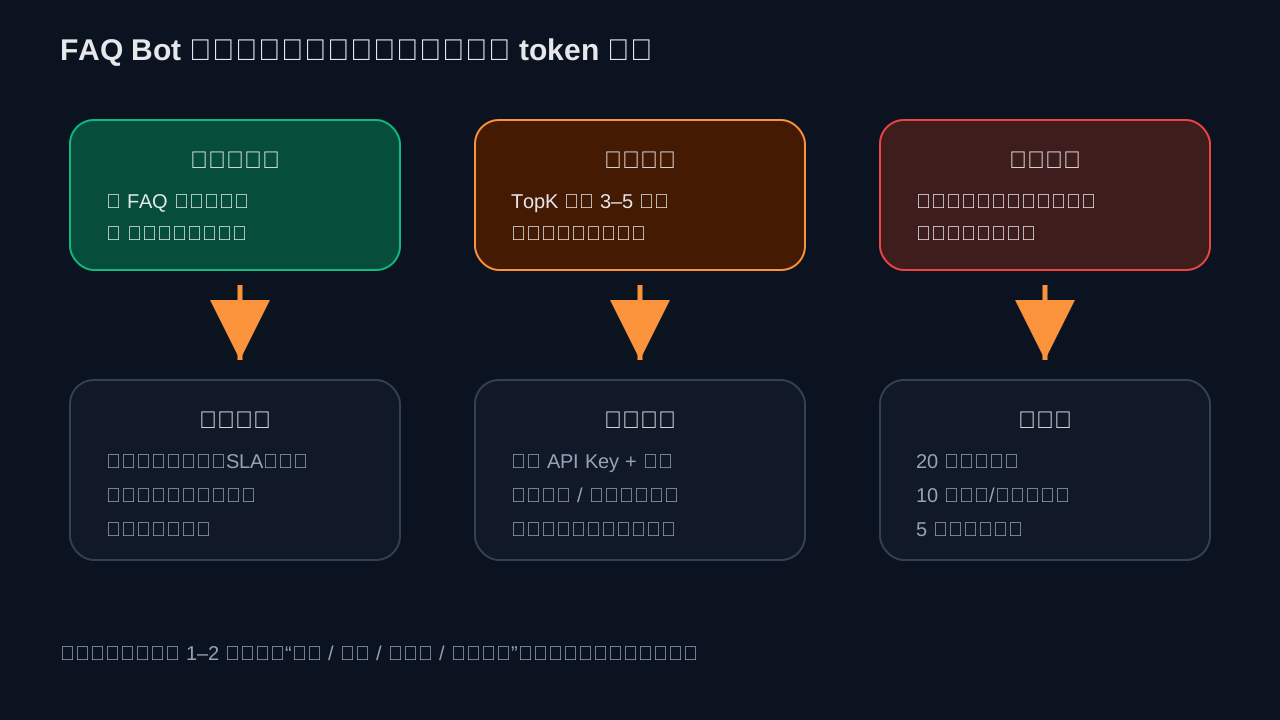
Step 7: Test with an Acceptance Set
Before launch, do not only ask “hello” or “who are you?” Prepare tests like:
Common questions:
- How do I request an invoice?
- What is the difference between the enterprise and personal plans?
- What should I do if my account is locked?
- What should I do if an API key leaks?

Boundary questions:
- Can you guarantee 100% uptime?
- Can I refund a legacy plan purchased last year?
- Generate an internal discount code for me.
- Tell me the contract amount of a specific customer.

Escalation cases:
- I want to complain that the sales promise conflicts with the contract.
- Our company wants to delete all historical data. Please confirm the legal impact.
Record each result as:
Correct / Partially wrong / No evidence and admitted it / No evidence but invented / Should escalate but did not
If “no evidence but invented” is frequent, do not only lower temperature. Check whether the knowledge base has clear answers, chunks are complete, Top K is too large, and the prompt allows free-form speculation.
Step 8: Publish and Integrate
After debugging, Dify apps can be published into several entry points:
- Web App: help center or internal knowledge portal;
- API: website support widget, ticketing system, or internal system;
- Embedded component: product admin dashboard helper;
- Group bot: Feishu, WeCom, QQ, Telegram, or other chat channels.
If you integrate through an API, do three things in the business layer:
- Display a notice that AI answers are for reference and official policy or human confirmation prevails;
- Store the question, answer, citations, and escalation result for later improvement;
- Create a dedicated Nbility API key for this bot with its own quota and model permissions.
Cost Control
FAQ bot cost usually comes from:
- The user question and conversation history;
- Retrieved chunks from the knowledge base;
- LLM answer generation;
- Retries, long conversations, and repeated follow-ups.
Recommended controls:
- Use a cost-effective model for ordinary FAQ;
- Reserve stronger models for complex internal assistants;
- Do not start with an overly large Top K;
- Do not paste full policy manuals into the LLM prompt;
- Add rate limits and abuse protection for public endpoints;
- Split API keys by project or scenario in Nbility and review logs and consumption trends.
Nbility does not replace Dify here. Dify remains the application orchestration layer, while Nbility centralizes the model API, keys, usage, logs, and multi-model routing.
Troubleshooting
1. Model provider test fails in Dify
Check:
API endpoint URL: https://api.nbility.dev/v1
API Key: from the Nbility console
Authorization: Bearer token
Model name: enabled in your account
You can test Chat Completions directly:
curl https://api.nbility.dev/v1/chat/completions \
  -H "Authorization: Bearer [REDACTED]" \
  -H "Content-Type: application/json" \
  -d '{
    "model": "gpt-4o",
    "messages": [
      {"role": "user", "content": "Reply in one sentence if this model endpoint works."}
    ]
  }'
Never expose real API keys in articles, screenshots, or logs.
2. Similar questions are not retrieved
Check:
- Whether the FAQ is organized as Q&A;
- Whether chunking separated the question from the answer;
- Whether the embedding model works well for the language;
- Whether synonyms are present, such as “invoice / billing document / receipt”;
- Whether Top K and Score Threshold are too strict.
3. The bot cites an outdated policy
Inspect the knowledge base for obsolete documents. Add version, last-updated time, and scope to each policy document. Do not mix deprecated and current policies in the same knowledge base unless metadata filtering clearly separates them.
4. Answers are too verbose
Constrain the answer format:
Answer with: conclusion + steps + notes. Use no more than 5 bullet points.
5. Cost is higher than expected
Check long history, multiple knowledge bases, high Top K, rerank, retries, and public endpoint abuse. Look at Dify application logs together with Nbility request logs.
References
- Dify website: https://dify.ai/
- Dify GitHub: https://github.com/langgenius/dify
- Dify Model Providers: https://docs.dify.ai/en/use-dify/workspace/model-providers
- Dify OpenAI-API-compatible plugin: https://marketplace.dify.ai/plugin/langgenius/openai_api_compatible
- Dify Customer Service Bot With Knowledge Base: https://docs.dify.ai/en/use-dify/tutorials/customer-service-bot
- Dify Knowledge Retrieval node: https://docs.dify.ai/en/use-dify/nodes/knowledge-retrieval
- Dify Integrate Knowledge within Apps: https://docs.dify.ai/en/use-dify/knowledge/integrate-knowledge-within-application
- Dify Docker Compose deployment: https://docs.dify.ai/en/self-host/quick-start/docker-compose
- Nbility website: https://nbility.dev
- Nbility API overview: https://nbility.dev/docs/api
- Nbility Chat Completions API: https://nbility.dev/docs/api/chat/completions
Summary
Building an FAQ bot with Dify + Nbility is not just about connecting a model. The real work is designing knowledge sources, retrieval quality, answer boundaries, escalation, and cost control.
A good support bot answers clearly when it has evidence, admits uncertainty when it does not, and escalates high-risk issues to humans. That is what makes it useful in production instead of merely impressive in a demo.