PDF Summarization Workflow: Contracts, Papers, and Manuals
Article 16 in the AI Agent hands-on series: build a practical PDF summarization workflow covering extraction, OCR, chunking, prompts, citations, and risk notes for contracts, academic papers, and manuals.

Many people try PDF summarization by uploading a file and asking: “Summarize this.” That works for short and clean documents, but it often fails with contracts, academic papers, and manuals.
Common problems include:
- The PDF text is not extracted correctly, especially for scanned files, two-column papers, and complex tables;
- The document is too long for a single model request;
- The summary sounds fluent but has no page numbers, clause IDs, or traceable evidence.
A reliable PDF summarization workflow should not start with summarization. It should start with extraction, chunking, citations, and risk boundaries.
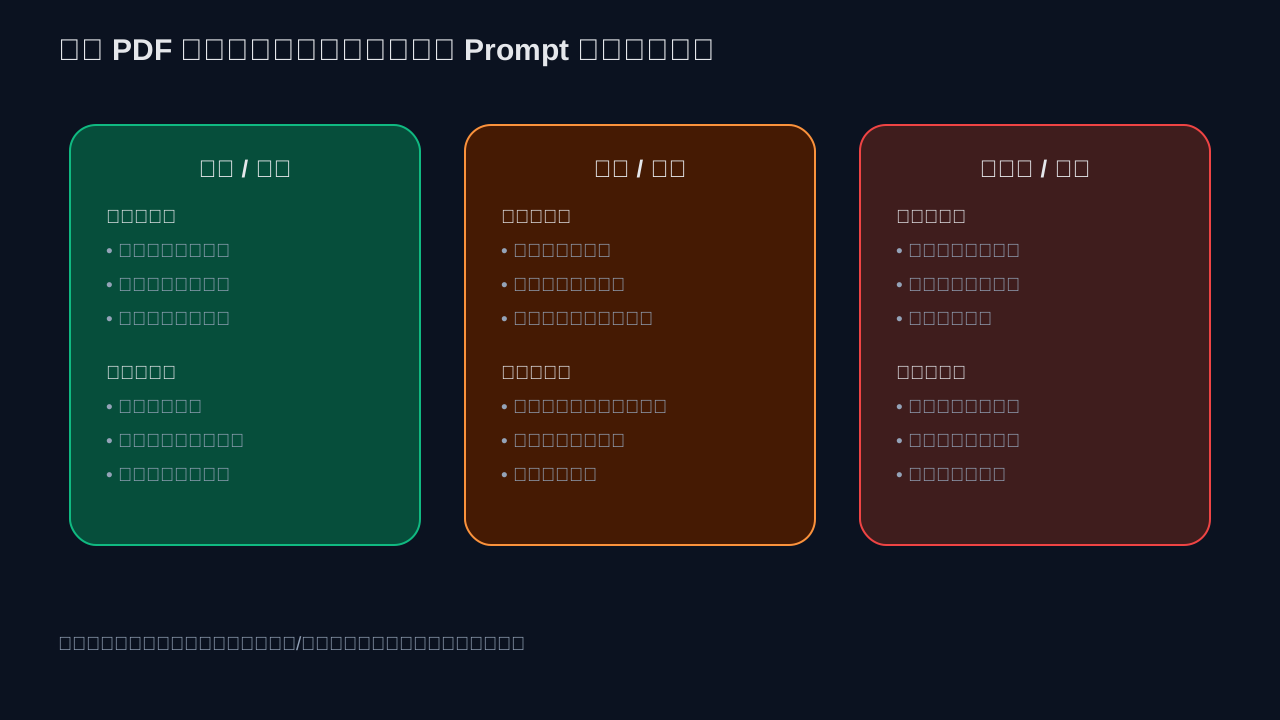
This guide covers three practical document types: contracts, papers, and manuals. They are all PDFs, but their summarization goals are different. Contracts focus on obligations and risks. Papers focus on methods and findings. Manuals focus on steps, parameters, and warnings.
First: Identify the Type of PDF
A PDF is not simply a text format. It is more like a page container. Before summarizing, identify which type you have:
- Native text PDF: text can be selected and copied, usually exported from Word, LaTeX, or HTML;
- Scanned PDF: essentially images, requiring OCR;
- Mixed PDF: some pages contain text, others are images;
- Complex-layout PDF: two-column papers, tables, footnotes, formulas, and captions;
- Form or contract PDF: signatures, clause numbers, attachments, tables, and blank fields.
If this first step is wrong, the final summary may be unreliable even if it sounds polished. A scanned contract without OCR may produce empty text. A two-column paper parsed in the wrong order can mix unrelated paragraphs.
Recommended Workflow
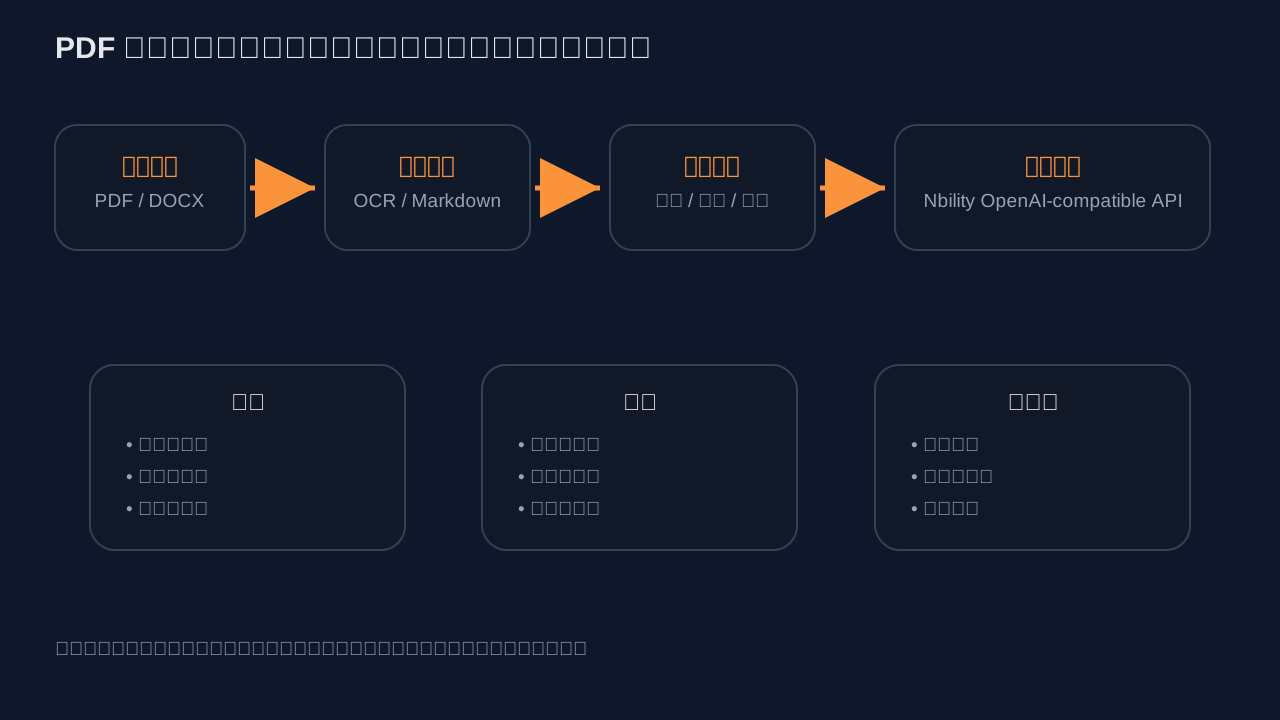
A general workflow looks like this:
Upload PDF
  -> Extract text / OCR / convert to Markdown
  -> Chunk by structure while keeping page numbers and headings
  -> Summarize by chunks or use retrieval-based Q&A
  -> Output summary, risks, citations, and next actions
Do not use the same prompt for every PDF. First convert the document into structured text that a model can read, then choose a summarization template based on the document type.
Option 1: Low-Code Workflow with Dify
If you want a low-code version, Dify's Document Extractor node is a good starting point.
Dify's official documentation explains that Document Extractor converts uploaded documents into text that LLMs can process, because language models cannot directly read formats such as PDF, DOCX, Excel, and PowerPoint. Its output variable is:
text
It supports common formats including:
- TXT, Markdown, HTML;
- DOCX and DOC;
- text-based PDFs;
- Excel and CSV, converted into Markdown tables;
- PPT, PPTX, emails, EPUB, JSON, YAML, and more.
A basic workflow:
Enable file upload in the Start node
  -> Document Extractor extracts text
  -> LLM node summarizes / analyzes risks / extracts key points
  -> Answer node returns the result
For DOC, PPT, complex formats, or external parsing capabilities, Dify documentation mentions these configuration variables:
UNSTRUCTURED_API_URL
UNSTRUCTURED_API_KEY
The key point: document processing is not only a model problem. The parser matters.
Option 2: Process PDFs with Python, Then Call a Model
For a more controllable workflow, use Python to convert PDFs into Markdown or structured text before calling an OpenAI-compatible API.
Extract Markdown with PyMuPDF / PyMuPDF4LLM
PyMuPDF has a dedicated “PyMuPDF, LLM & RAG” documentation page. It recommends using PyMuPDF4LLM to output Markdown, then chunking the result for LLM and RAG workflows.
Install:
pip install pymupdf pymupdf4llm openai
Convert PDF to Markdown:
import pathlib
import pymupdf4llm

md_text = pymupdf4llm.to_markdown("input.pdf")
pathlib.Path("output.md").write_text(md_text, encoding="utf-8")
For native text PDFs, PyMuPDF can also extract page text directly:
import pymupdf

with pymupdf.open("input.pdf") as doc:
    pages = []
    for i, page in enumerate(doc, start=1):
        text = page.get_text()
        pages.append(f"\n\n--- page {i} ---\n{text}")

open("output.txt", "w", encoding="utf-8").write("\n".join(pages))
Note: page.get_text() works for native text PDFs. Scanned pages still need OCR.
Do Not Send Long Documents in One Request
Long PDFs should be chunked. A simple approach is to split by page or heading, summarize each chunk, and then generate a final summary.
from pathlib import Path
from openai import OpenAI

client = OpenAI(
    api_key="[REDACTED]",
    base_url="https://api.nbility.dev/v1",
)

text = Path("output.md").read_text(encoding="utf-8")
chunks = [text[i:i+6000] for i in range(0, len(text), 6000)]

partial_summaries = []
for idx, chunk in enumerate(chunks, start=1):
    resp = client.chat.completions.create(
        model="gpt-4o",
        messages=[
            {"role": "system", "content": "You are a document analysis assistant. Preserve page numbers, headings, and evidence."},
            {"role": "user", "content": f"This is document chunk {idx}. Summarize key points, risks, and items to verify:\n\n{chunk}"},
        ],
        temperature=0.2,
    )
    partial_summaries.append(resp.choices[0].message.content)

final_resp = client.chat.completions.create(
    model="gpt-4o",
    messages=[
        {"role": "system", "content": "You are a document summarization assistant. Generate the final summary only from the partial summaries. Do not add unsupported claims."},
        {"role": "user", "content": "\n\n".join(partial_summaries)},
    ],
    temperature=0.2,
)

print(final_resp.choices[0].message.content)
This uses Nbility's OpenAI-compatible Chat Completions API:
Base URL: https://api.nbility.dev/v1
Authorization: Bearer [REDACTED]
Endpoint: POST /v1/chat/completions
Nbility fits naturally at this stage: API keys, models, logs, and usage are centralized. PDF extraction can stay local or in Dify, while model calls go through one consistent endpoint.
Option 3: Use Direct Model File Inputs
OpenAI's official File Inputs documentation explains that the Responses API can accept PDFs as input_file, using a file URL, an uploaded file ID, or Base64 data. It also notes that Chat Completions does not support file URLs; file URLs should be used with the Responses API.
This approach is suitable when:
- You need to analyze a single PDF quickly;
- You do not want to build your own parser or OCR pipeline;
- Document size, permissions, and cost are under control;
- You accept the model platform handling file parsing.
For enterprise workflows, however, keeping your own extraction layer is often better because you can:
- Control OCR;
- Preserve page numbers and paragraphs;
- Cache parsed documents to avoid repeated cost;
- Handle privacy and compliance;
- Produce traceable citations.
How to Summarize Contracts
For contracts, the most important rule is: do not replace legal review. AI can speed up reading, but it should not provide final legal advice.
Recommended output:
## One-sentence conclusion
This contract mainly covers... Pay attention to payment, delivery, liability, and termination clauses.

## Basic Information
- Parties:
- Amount:
- Effective date:
- Term:
- Deliverables:

## Key Obligations
- Party A obligations:
- Party B obligations:

## Risk Clauses
- Liability: cite clause / page
- Payment terms: cite clause / page
- Termination: cite clause / page

## Items to Verify Manually
- Is there a supplemental agreement?
- Are all attachments included?
- Is the signature page complete?
Contract prompt example:
You are a contract reading assistant, not a legal advisor. Based only on the document, output:
1. Basic contract information;
2. Core obligations of each party;
3. Summary of payment, delivery, acceptance, liability, termination, and confidentiality clauses;
4. Risk points that may require legal review;
5. Page numbers, clause IDs, or source snippets for each important conclusion.

If the document does not contain clear evidence, write “No clear evidence found in the document.” Do not guess.
How to Summarize Academic Papers
Do not summarize a paper by reading only the abstract. The useful parts are the research question, method, experimental setup, results, limitations, and reproducibility.
Recommended output:
## What problem does this paper solve?

## Core Contributions
- Contribution 1:
- Contribution 2:

## Method Overview

## Experimental Setup
- Datasets:
- Baselines:
- Metrics:

## Main Findings

## Limitations

## Which pages should I read carefully?
Paper-specific concerns:
- Two-column layout may break reading order;
- Formulas and tables may be lost;
- Do not infer chart conclusions from captions alone;
- For arXiv papers, HTML, LaTeX source, or official project pages can help verify details.
If you are building a paper library rather than summarizing one paper, consider RAG: convert papers to Markdown, split by heading hierarchy, index chunks, and retrieve relevant passages for each question.
How to Summarize Manuals
Manuals are about preserving steps, warnings, and parameter units. For hardware, medicine, devices, and software deployment, missing a prerequisite can create real risk.
Recommended output:
## Target User

## Quick Start Steps
1.
2.
3.

## Parameter Table
| Parameter | Default | Purpose | Risk |

## Safety Warnings

## Troubleshooting
- Symptom:
- Possible cause:
- Resolution steps:
Prompt rule:
Summarize the manual, but do not omit safety warnings, prerequisites, parameter units, or order dependencies.
If steps have a required sequence, preserve the original order.
If a parameter lacks a unit or range, mark it as “verify in the original document.”
When You Need OCR or a Stronger Parser
Basic text extraction may not be enough when:
- Copying text from the PDF returns nothing;
- Headers and footers are mixed into body text;
- Two-column reading order is broken;
- Tables become unstructured text;
- Pages are scanned or photographed;
- Formulas, footnotes, and figure captions are important.
Useful tools:
- PyMuPDF / PyMuPDF4LLM: fast, local, controllable extraction to text or Markdown;
- Unstructured: multi-format document partitioning and chunking, also available through APIs;
- Marker: open-source PDF conversion to Markdown, JSON, HTML, and chunks, useful for complex documents and RAG preprocessing; check its code and model licenses before commercial use;
- Dify Document Extractor: useful for low-code file upload and extraction workflows.
A practical escalation path:
Native PDF -> PyMuPDF4LLM
Scanned PDF -> OCR / Unstructured / Marker
Low-code upload summary -> Dify Document Extractor
Enterprise knowledge base -> parse first, then index and retrieve
Cost Control
PDF summarization can consume a lot of tokens because users upload documents with dozens or hundreds of pages.
Recommendations:
- Parse and cache first: do not parse and summarize the same file repeatedly;
- Local first, global later: use map-reduce style summarization for long documents;
- Choose models by scenario: use cost-effective models for ordinary summaries and stronger models for contract risk or complex papers;
- Return citations instead of large source passages;
- Limit upload size and page count on public endpoints;
- Track usage and failure reasons with Nbility logs and quota management.
FAQ
1. Why did the model miss an important clause?
Often the model never saw it. Check the extracted Markdown or TXT first, then check whether the chunk containing the clause was sent to the model.
2. How should scanned PDFs be handled?
Scanned PDFs need OCR. Do not expect basic get_text() extraction to read text inside images. Use OCR tools, Unstructured, Marker, or a document service with OCR capabilities.
3. Why are table summaries inaccurate?
Convert tables into Markdown tables or CSV before summarization. Do not send broken table text directly to the model.
4. Can a contract summary be sent directly to a customer?
Usually no. Mark it as an aid for reading, not legal advice, and keep page numbers, clause IDs, and items requiring legal review.
5. What is the difference between RAG and summarization?
Summarization compresses all or part of a document into shorter text. RAG retrieves relevant passages based on a question and then answers from them. If users repeatedly ask questions over the same PDF collection, consider RAG. If they only need to read one document, summarization may be enough.
References
- OpenAI File Inputs: https://developers.openai.com/api/docs/guides/file-inputs
- Dify Document Extractor: https://docs.dify.ai/en/use-dify/nodes/doc-extractor
- Dify Knowledge Retrieval: https://docs.dify.ai/en/use-dify/nodes/knowledge-retrieval
- PyMuPDF documentation: https://pymupdf.readthedocs.io
- PyMuPDF LLM & RAG: https://pymupdf.readthedocs.io/en/latest/rag.html
- PyMuPDF4LLM GitHub: https://github.com/pymupdf/pymupdf4llm
- Unstructured documentation: https://docs.unstructured.io/open-source/core-functionality/partitioning
- Unstructured GitHub: https://github.com/Unstructured-IO/unstructured
- Marker GitHub: https://github.com/datalab-to/marker
- Nbility API overview: https://nbility.dev/docs/api
- Nbility Chat Completions API: https://nbility.dev/docs/api/chat/completions
Summary
PDF summarization is not just “send a file to a model.” A stable workflow identifies the PDF type, chooses the right parser, preserves structure and page numbers, uses document-specific prompts, and returns citations and risk notes.
Contracts, papers, and manuals can all benefit from AI, but their goals differ. Contracts need risk review. Papers need method and evidence analysis. Manuals need ordered steps and warnings. Once this is designed clearly, an OpenAI-compatible model gateway such as Nbility becomes the unified model layer for the workflow.