Advanced QQ Group AI Bot: Summaries, Image Generation, and Status Page Screenshots
A practical engineering guide for building a maintainable QQ group AI bot with NapCat, OneBot v11, NoneBot2, model APIs, daily summaries, image generation, status screenshots, rate limits, and troubleshooting.
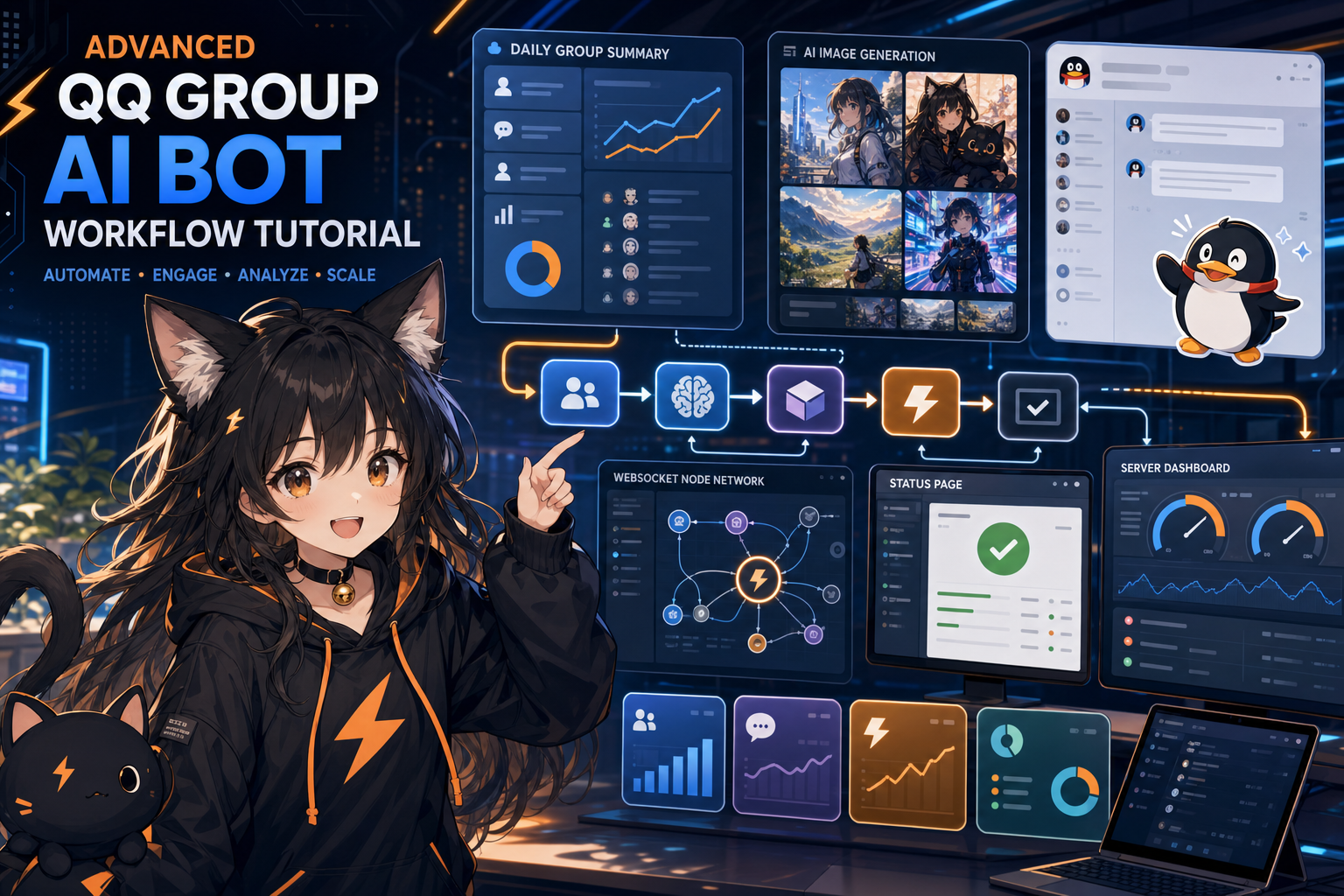
Many QQ bot tutorials stop at “reply with one sentence.” Once the bot enters a real group, the problem becomes more operational: should it read every message? How do you generate a daily summary without inventing facts? What should happen when image generation fails? How do you prevent a status-page screenshot feature from being abused to access internal URLs?
This article treats a QQ group bot as a small online service. We will split it into protocol access, message routing, group summaries, image generation, status screenshots, permissions, rate limits, and cost control.
Treat the bot as a service, not a script
A real group bot needs at least the following:
- Stable connection between NapCat, OneBot WebSocket, and the business service.
- Clear permissions for image generation, status screenshots, and configuration changes.
- Controlled output: summaries should not leak sensitive content, and image failures should be understandable.
- Cost control: sending every group message to a large model is expensive.
- Logs: 403 errors, disconnects, model errors, and image delivery failures must be traceable.
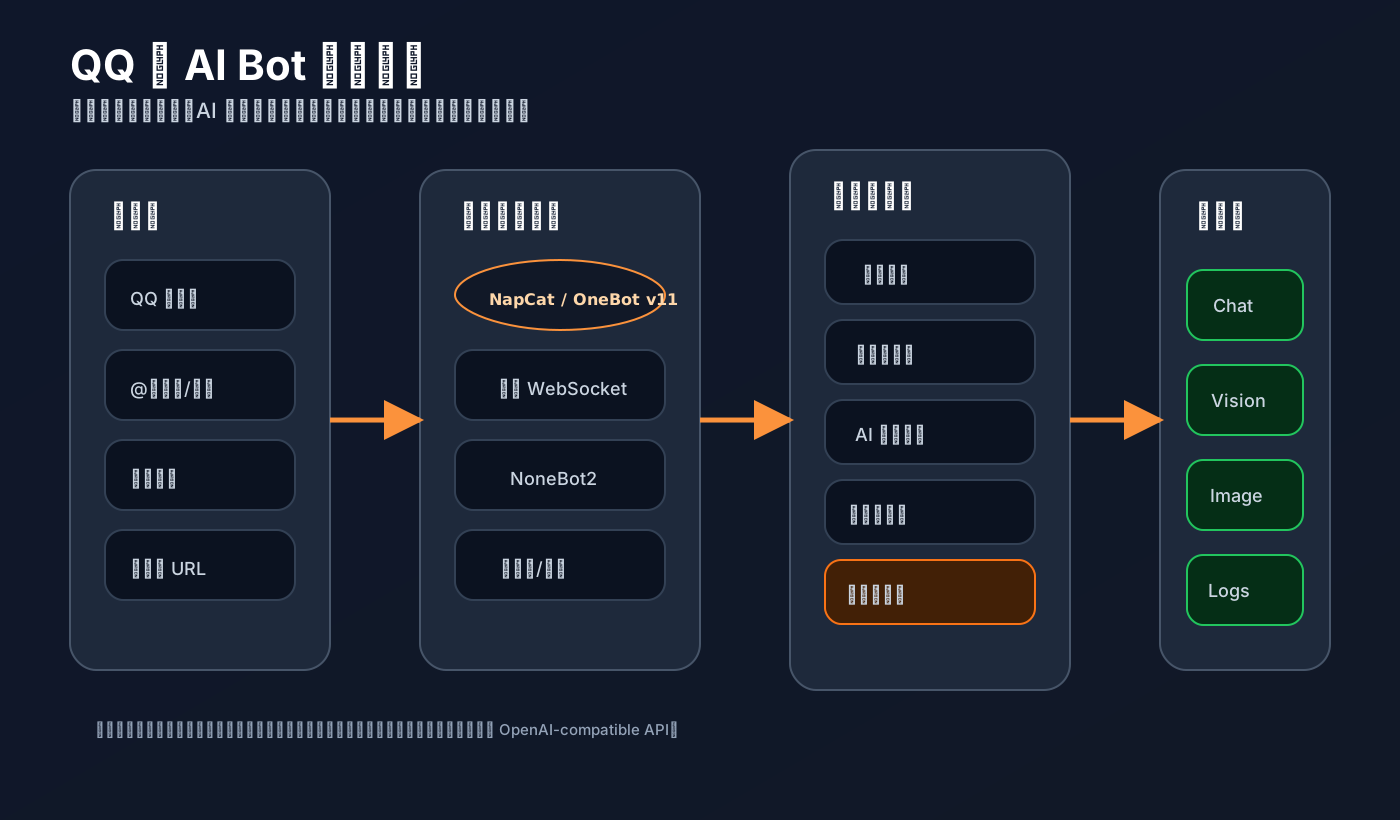
Recommended stack: NapCat + OneBot v11 + NoneBot2 + model API
A practical architecture looks like this:
QQ group message
  -> NapCat / OneBot v11
  -> reverse WebSocket
  -> NoneBot2 or your own WebSocket service
  -> business logic: Q&A, summaries, images, status screenshots
  -> OpenAI-compatible model API
  -> OneBot message segments back to the QQ group
Responsibilities:
- NapCat logs into QQ, sends and receives messages, and exposes capabilities through OneBot HTTP / WebSocket. Its integration docs mention reverse WebSocket for NoneBot, commonly
ws://127.0.0.1:8080/onebot/v11/ws. In Docker, replace127.0.0.1with the container name or reachable service address. - OneBot v11 defines the shared message, event, and API protocol. It evolved from the CQHTTP ecosystem to make bot applications more portable.
- NoneBot2 receives events, organizes plugins, routes commands, and handles async workflows.
- Model API layer provides chat, summarization, vision, and image generation. An OpenAI-compatible entry point is convenient because it keeps model switching and usage tracking centralized.
Basic project layout
qq-ai-bot/
├── bot.py
├── plugins/
│   ├── __init__.py
│   └── ai_group.py
├── .env
└── requirements.txt
requirements.txt:
nonebot2[fastapi]
nonebot-adapter-onebot
httpx
python-dotenv
playwright
Install dependencies:
python -m venv .venv
source .venv/bin/activate
pip install -r requirements.txt
playwright install chromium
bot.py:
import nonebot
from nonebot.adapters.onebot.v11 import Adapter as ONEBOT_V11Adapter

nonebot.init()
driver = nonebot.get_driver()
driver.register_adapter(ONEBOT_V11Adapter)
nonebot.load_plugins("plugins")

if __name__ == "__main__":
    nonebot.run(host="0.0.0.0", port=8080)
.env:
ONEBOT_ACCESS_TOKEN=[REDACTED]
NBILITY_API_KEY=[REDACTED]
NBILITY_BASE_URL=https://api.nbility.dev/v1
NBILITY_CHAT_MODEL=gpt-4o
NBILITY_IMAGE_MODEL=gpt-image-2
BOT_ADMIN_USERS=123456789,987654321
ALLOWED_GROUPS=1234567890
In NapCat WebUI, add a WebSocket client:
ws://your-business-service:8080/onebot/v11/ws
If both services run on the same machine, 127.0.0.1 may work. In Docker, use the service name or host IP. Keep the token consistent, or you will likely see 403 errors.
Message routing: do not feed the whole group chat to the model
Split group messages into three categories:
- Explicit triggers: mentions,
/ask,/draw,/status. - Low-cost recording: store recent text messages for summaries.
- Ignored messages: emojis, spam, very short messages, repeated messages, and the bot’s own messages.
A simplified plugin:
# plugins/ai_group.py
import os
import time
from collections import defaultdict, deque

import httpx
from nonebot import on_command, on_message
from nonebot.adapters.onebot.v11 import Bot, GroupMessageEvent, Message, MessageSegment
from nonebot.params import CommandArg

BASE_URL = os.getenv("NBILITY_BASE_URL", "https://api.nbility.dev/v1")
API_KEY = os.getenv("NBILITY_API_KEY", "[REDACTED]")
CHAT_MODEL = os.getenv("NBILITY_CHAT_MODEL", "gpt-4o")
ALLOWED_GROUPS = {int(x) for x in os.getenv("ALLOWED_GROUPS", "").split(",") if x.strip()}

recent_messages: dict[int, deque[str]] = defaultdict(lambda: deque(maxlen=300))
last_call_at: dict[tuple[int, str], float] = {}

async def call_chat(messages, *, temperature=0.3):
    async with httpx.AsyncClient(timeout=60) as client:
        r = await client.post(
            f"{BASE_URL}/chat/completions",
            headers={"Authorization": f"Bearer {API_KEY}", "Content-Type": "application/json"},
            json={"model": CHAT_MODEL, "messages": messages, "temperature": temperature},
        )
        r.raise_for_status()
        return r.json()["choices"][0]["message"]["content"]

def allowed(event: GroupMessageEvent) -> bool:
    return not ALLOWED_GROUPS or event.group_id in ALLOWED_GROUPS

def rate_limited(group_id: int, key: str, seconds: int = 10) -> bool:
    now = time.time()
    k = (group_id, key)
    if now - last_call_at.get(k, 0) < seconds:
        return True
    last_call_at[k] = now
    return False

collector = on_message(priority=99, block=False)

@collector.handle()
async def collect(event: GroupMessageEvent):
    if not allowed(event):
        return
    text = event.get_plaintext().strip()
    if len(text) >= 4 and not text.startswith("/"):
        recent_messages[event.group_id].append(f"User {event.user_id}: {text}")
This listener only records recent messages. Model calls should happen inside explicit commands.
Q&A: call the model only when triggered
ask = on_command("ask", aliases={"问", "提问"}, priority=10, block=True)

@ask.handle()
async def handle_ask(bot: Bot, event: GroupMessageEvent, args: Message = CommandArg()):
    if not allowed(event):
        return
    question = args.extract_plain_text().strip()
    if not question:
        await ask.finish("Usage: /ask your question")
    if rate_limited(event.group_id, f"ask:{event.user_id}", 8):
        await ask.finish("Please wait a few seconds before asking again.")

    context = "
".join(list(recent_messages[event.group_id])[-30:])
    answer = await call_chat([
        {"role": "system", "content": "You are a technical assistant in a QQ group. Be concise and accurate. Say when you are uncertain."},
        {"role": "user", "content": f"Recent group context:
{context}

User question: {question}"},
    ])
    await ask.finish(answer[:1800])
Key points:
- Use only recent context.
- Add per-user cooldown.
- Keep group replies readable.
- Ask the model to state uncertainty instead of guessing.
Daily summaries: avoid turning chat logs into noise
A useful summary should not be a transcript. Filter first, then summarize:
summary = on_command("summary", aliases={"总结", "群总结"}, priority=10, block=True)

@summary.handle()
async def handle_summary(event: GroupMessageEvent):
    if not allowed(event):
        return
    lines = list(recent_messages[event.group_id])
    useful = [x for x in lines if len(x) >= 10]
    if len(useful) < 8:
        await summary.finish("Not enough useful messages to summarize yet.")

    content = "
".join(useful[-180:])
    result = await call_chat([
        {"role": "system", "content": "Generate a QQ group daily summary. Use only the provided messages. Do not add external facts."},
        {"role": "user", "content": f"Output with this structure:
1. Highlights
2. Confirmed facts
3. Action items
4. Unconfirmed or disputed points
5. Questions worth revisiting

Group logs:
{content}"},
    ], temperature=0.2)
    await summary.finish(result[:2500])
For scheduled daily summaries, store messages in SQLite or PostgreSQL and trigger the summary with APScheduler, cron, or system timers. Do not rely on in-memory buffers in production.
Image generation: design failure handling early
Image generation is popular and failure-prone. Add these rules from day one:
- Trigger by command, such as
/draw .... - Per-user cooldown.
- Basic prompt safety checks.
- Clear failure messages.
With an OpenAI-compatible image endpoint, a unified provider such as Nbility lets chat and image generation share the same API key, base URL, usage tracking, and error handling:
async def create_image(prompt: str) -> str:
    image_model = os.getenv("NBILITY_IMAGE_MODEL", "gpt-image-2")
    async with httpx.AsyncClient(timeout=180) as client:
        r = await client.post(
            f"{BASE_URL}/images/generations",
            headers={"Authorization": f"Bearer {API_KEY}", "Content-Type": "application/json"},
            json={"model": image_model, "prompt": prompt, "size": "1024x1024"},
        )
        if r.status_code >= 400:
            raise RuntimeError(f"image api failed: {r.status_code} {r.text[:300]}")
        data = r.json()
        return data["data"][0].get("url") or data["data"][0].get("b64_json")
Command handler:
draw = on_command("draw", aliases={"画图", "生图"}, priority=10, block=True)

@draw.handle()
async def handle_draw(event: GroupMessageEvent, args: Message = CommandArg()):
    if not allowed(event):
        return
    prompt = args.extract_plain_text().strip()
    if not prompt:
        await draw.finish("Usage: /draw an orange-and-black futuristic cat robot poster")
    if len(prompt) > 300:
        await draw.finish("The prompt is too long. Keep it under 300 characters.")
    if rate_limited(event.group_id, f"draw:{event.user_id}", 45):
        await draw.finish("Image generation takes time. Please wait before trying again.")

    try:
        url_or_b64 = await create_image(prompt)
    except Exception as e:
        await draw.finish(f"Image generation failed: {str(e)[:160]}
Try a more specific prompt with fewer sensitive terms.")

    if url_or_b64.startswith("http"):
        await draw.finish(MessageSegment.image(url_or_b64))
    await draw.finish("Image generated, but this example does not handle base64 file saving. Save it locally before sending in production.")
For production, save the image locally or upload it to a CDN, send it as a OneBot image segment, and also return the original link in case native QQ image delivery fails.
Status page screenshots: use Playwright, but whitelist URLs
Playwright’s Python docs show page.screenshot(path="screenshot.png") and full_page=True, which is perfect for status pages. But you must whitelist URLs, otherwise users could make the bot access internal services.
from pathlib import Path
from urllib.parse import urlparse
from playwright.async_api import async_playwright

ALLOWED_STATUS_HOSTS = {"status.example.com", "status.nbility.dev"}
SCREENSHOT_DIR = Path("/tmp/qq-bot-screenshots")
SCREENSHOT_DIR.mkdir(parents=True, exist_ok=True)

async def screenshot_status(url: str) -> Path:
    parsed = urlparse(url)
    if parsed.scheme not in {"https", "http"} or parsed.hostname not in ALLOWED_STATUS_HOSTS:
        raise ValueError("This URL is not allowed for screenshots.")

    out = SCREENSHOT_DIR / f"status-{int(time.time())}.png"
    async with async_playwright() as p:
        browser = await p.chromium.launch(headless=True)
        page = await browser.new_page(viewport={"width": 1440, "height": 1000})
        await page.goto(url, wait_until="networkidle", timeout=20000)
        await page.screenshot(path=str(out), full_page=True)
        await browser.close()
    return out
Command example:
status = on_command("status", aliases={"状态页", "api状态"}, priority=10, block=True)

@status.handle()
async def handle_status(event: GroupMessageEvent, args: Message = CommandArg()):
    url = args.extract_plain_text().strip() or "https://status.nbility.dev"
    try:
        path = await screenshot_status(url)
    except Exception as e:
        await status.finish(f"Screenshot failed: {str(e)[:180]}")
    await status.finish(MessageSegment.image(path.as_uri()))
Different OneBot implementations vary in how they accept local files, file:// URIs, and HTTP image URLs. If local files fail, upload the screenshot to a static directory and send an HTTPS URL instead. Also cache screenshots for 30–120 seconds.
Run it with systemd
Do not keep the bot alive in an SSH window. Use systemd:
# /etc/systemd/system/qq-ai-bot.service
[Unit]
Description=QQ AI Bot Service
After=network-online.target
Wants=network-online.target

[Service]
Type=simple
WorkingDirectory=/opt/qq-ai-bot
EnvironmentFile=/etc/qq-ai-bot.env
ExecStart=/opt/qq-ai-bot/.venv/bin/python bot.py
Restart=always
RestartSec=5
User=qqbot
Group=qqbot

[Install]
WantedBy=multi-user.target
Start it:
sudo systemctl daemon-reload
sudo systemctl enable --now qq-ai-bot
sudo systemctl status qq-ai-bot --no-pager
journalctl -u qq-ai-bot -f
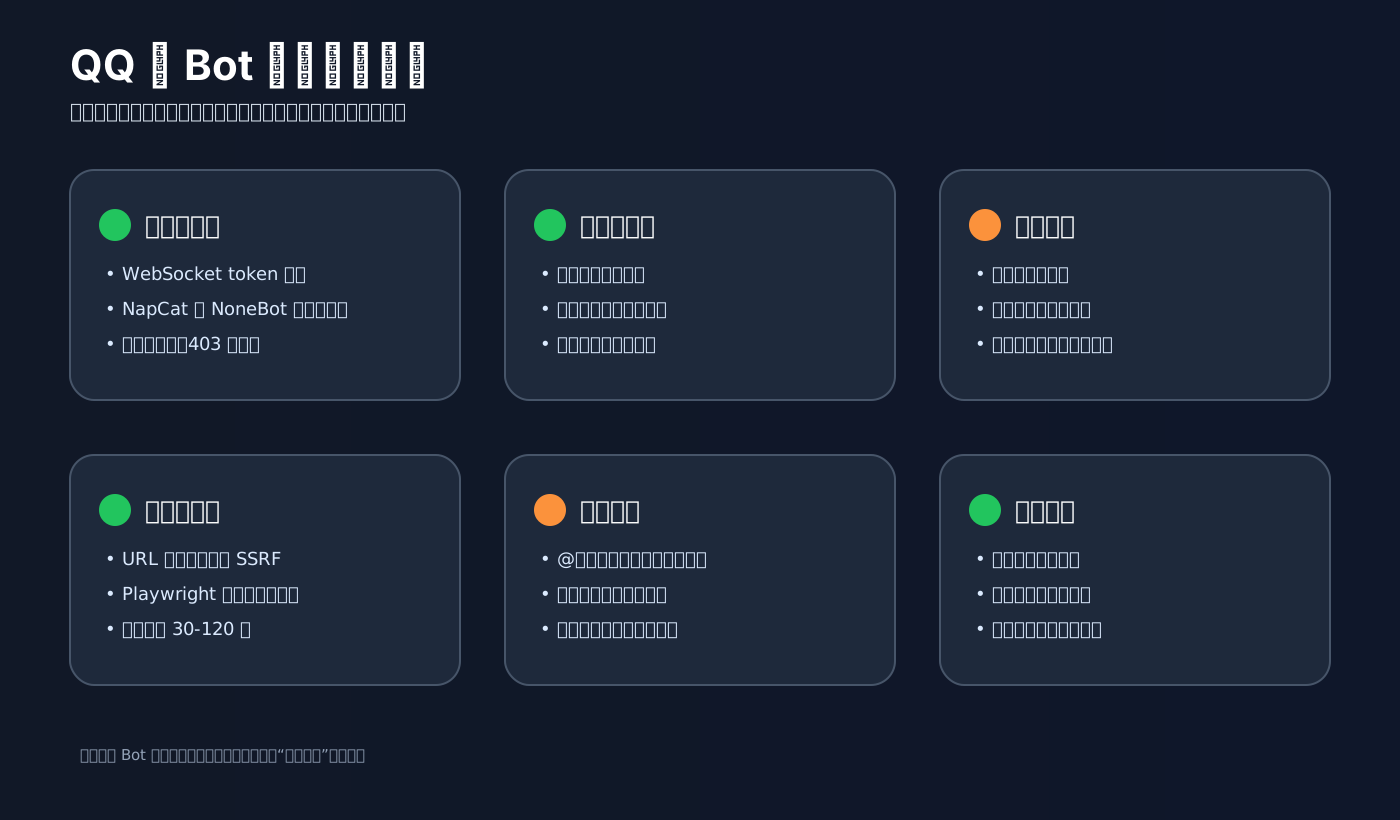
Troubleshooting
NapCat returns 403 when connecting to NoneBot
Check the token first. NapCat and ONEBOT_ACCESS_TOKEN must match. Also confirm the reverse WebSocket path is usually /onebot/v11/ws.
127.0.0.1 does not work inside Docker
Inside a container, 127.0.0.1 points to the container itself. Use the service name on the same Docker network:
ws://qq-ai-bot:8080/onebot/v11/ws
or use a reachable host IP.
QQ images fail to send
Check which image formats your OneBot implementation supports: URL, local file, or uploaded file. Log the image source, file size, and API response.
Group summaries look like transcripts
Filter short, repeated, and low-value messages first. Ask the model to output highlights, confirmed facts, action items, disputed points, and questions worth revisiting.
Image generation fails often
Common causes: overly long prompts, safety policy issues, temporary model load, or network timeouts. Retry at most once, keep cooldowns, and return a clear message to the user.
Model cost grows too fast
Default to command/mention triggers. Compress summary context before calling a large model. Give image generation a longer cooldown. Track usage by group, user, and feature.
Suggested launch order
- Connect NapCat and NoneBot2 with only
/ping. - Add
/askfor admins or a test group. - Add message caching and manual
/summary. - Add scheduled daily summaries after quality is stable.
- Add
/statusscreenshots with a URL whitelist. - Add
/drawwith cooldowns, failure messages, and usage tracking.
Closing notes
The advanced part of a QQ group AI bot is not “using one more model.” It is about making the bot maintainable: stable protocol access, explicit commands and permissions, centralized model APIs, logs, rate limits, and fallback behavior.
NapCat, OneBot v11, and NoneBot2 reliably bring QQ group events into your business logic. Playwright adds practical screenshot capability. An OpenAI-compatible API entry point such as Nbility is a good fit for the model layer because it centralizes chat, image generation, usage tracking, and future model switching.
References
- NapCatQQ integration docs: https://napneko.github.io/use/integration
- NapCatQQ overview: https://napneko.github.io/guide/napcat
- OneBot v11 standard: https://github.com/botuniverse/onebot-11
- NoneBot OneBot v11 adapter docs: https://onebot.adapters.nonebot.dev/docs/api/v11/index
- go-cqhttp GitHub: https://github.com/Mrs4s/go-cqhttp
- go-cqhttp API docs: https://docs.go-cqhttp.org/api
- Playwright Python screenshots: https://playwright.dev/python/docs/screenshots
- Nbility API overview: https://nbility.dev/docs/api
- Nbility Chat Completions API: https://nbility.dev/docs/api/chat/completions