Calling Nbility from Python: Chat, Streaming, and Error Handling
A practical Python developer guide for using Nbility as an OpenAI-compatible API: environment variables, openai-python setup, Chat Completions, streaming output, timeouts, retries, error classification, logging, and cost control.

If you want to add AI features to a script, backend job, bot, or web service, the best starting point is not a complex Agent framework. First, make three basics reliable: one normal chat call, one streaming response, and one debuggable error-handling path.
This tutorial shows how to call Nbility’s OpenAI-compatible Chat Completions API from Python. You can keep using the familiar openai Python SDK; the main change is setting base_url to Nbility and keeping the API key in environment variables. Once this foundation works, it can power Dify, Hermes Agent, Telegram bots, internal automations, and your own backend services.
Understand the Call Flow
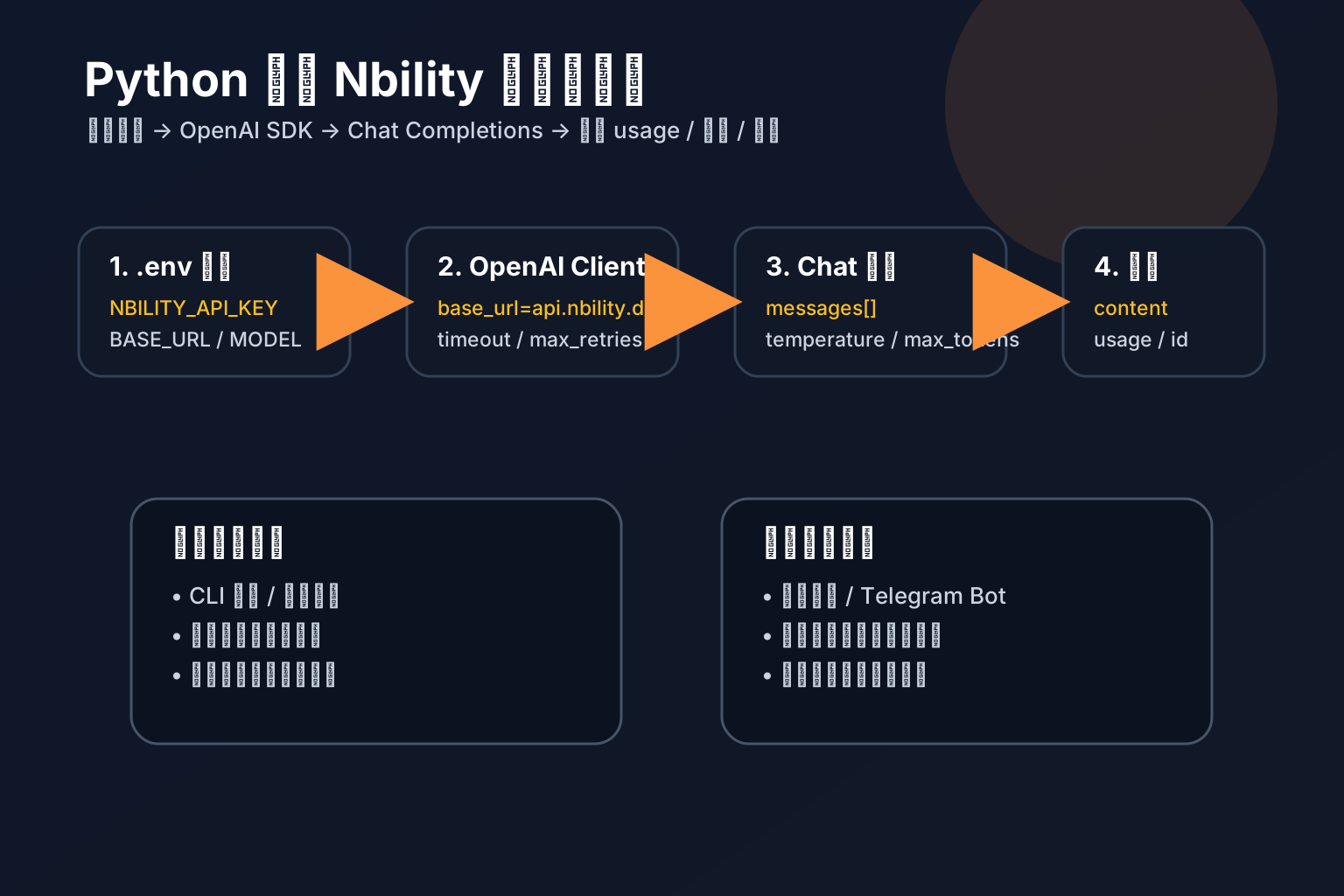
The minimal flow has four steps:
- Store
NBILITY_API_KEY,NBILITY_BASE_URL, andNBILITY_MODELin.env; - Create a Python client with
OpenAI(api_key=..., base_url=...); - Send
messageswithclient.chat.completions.create(); - Read
choices[0].message.content, while loggingusage, latency, and errors.
Nbility’s Chat Completions documentation uses POST /v1/chat/completions, a Bearer token in the Authorization header, a request body with model and messages, and stream: true for SSE streaming. The OpenAI Chat Completions API uses the same core structure, so the Python SDK fits naturally.
Prepare the Environment
Use a virtual environment so the project remains isolated:
python -m venv .venv
source .venv/bin/activate
pip install openai python-dotenv
Create .env:
NBILITY_API_KEY=[REDACTED]
NBILITY_BASE_URL=https://api.nbility.dev/v1
NBILITY_MODEL=gpt-4o
Keep the real key in local environment variables, server secrets, or CI secrets. Never commit it to Git, expose it in frontend code, screenshots, or logs.
Minimal Chat Call
Create chat_once.py:
import os
from openai import OpenAI
from dotenv import load_dotenv

load_dotenv()

client = OpenAI(
    api_key=os.environ["NBILITY_API_KEY"],
    base_url=os.getenv("NBILITY_BASE_URL", "https://api.nbility.dev/v1"),
)

response = client.chat.completions.create(
    model=os.getenv("NBILITY_MODEL", "gpt-4o"),
    messages=[
        {"role": "system", "content": "You are a concise and reliable technical assistant."},
        {"role": "user", "content": "Explain OpenAI-compatible APIs in three sentences."},
    ],
    temperature=0.3,
    max_tokens=300,
)

print(response.choices[0].message.content)
if response.usage:
    print("usage:", response.usage)
Run it:
python chat_once.py
If this works, you have validated the most important pieces: key, Base URL, model name, network access, and SDK compatibility.
Wrap It as a Reusable Function
In real projects, avoid scattering API calls everywhere. Wrap the client once:
import os
from openai import OpenAI

client = OpenAI(
    api_key=os.environ["NBILITY_API_KEY"],
    base_url=os.getenv("NBILITY_BASE_URL", "https://api.nbility.dev/v1"),
    timeout=60,
    max_retries=2,
)


def ask_ai(prompt: str, system: str = "You are a reliable technical assistant.") -> str:
    response = client.chat.completions.create(
        model=os.getenv("NBILITY_MODEL", "gpt-4o"),
        messages=[
            {"role": "system", "content": system},
            {"role": "user", "content": prompt},
        ],
        temperature=0.2,
        max_tokens=800,
    )
    return response.choices[0].message.content or ""
Two settings matter here:
timeout=60: prevents a request from hanging forever;max_retries=2: handles temporary network issues without infinite retries.
With Nbility as the unified model gateway, you can switch models via environment variables instead of editing application code. For example, use a cheaper model in development and a stronger model for important production tasks.
Streaming Output
Streaming is useful for chat UIs, command-line assistants, and community bots. The user can see the first tokens quickly instead of waiting for the whole answer.
Create chat_stream.py:
import os
from openai import OpenAI
from dotenv import load_dotenv

load_dotenv()

client = OpenAI(
    api_key=os.environ["NBILITY_API_KEY"],
    base_url=os.getenv("NBILITY_BASE_URL", "https://api.nbility.dev/v1"),
)

stream = client.chat.completions.create(
    model=os.getenv("NBILITY_MODEL", "gpt-4o"),
    messages=[{"role": "user", "content": "Write a short Python API integration tip."}],
    stream=True,
    temperature=0.4,
)

for chunk in stream:
    delta = chunk.choices[0].delta.content
    if delta:
        print(delta, end="", flush=True)

print()
Nbility returns Server-Sent Events when stream: true is enabled. The OpenAI Python SDK parses those events into iterable chunks, so you only need to read delta.content.
For web apps, your backend can forward those chunks as SSE or WebSocket messages. For Telegram, QQ, or Feishu bots, it is usually better to edit a message in segments or send an initial “working on it” message, rather than sending one message per token.
Error Handling: Avoid Plain except Exception
The hard part in production is not the happy path. It is knowing what failed and what action to take.
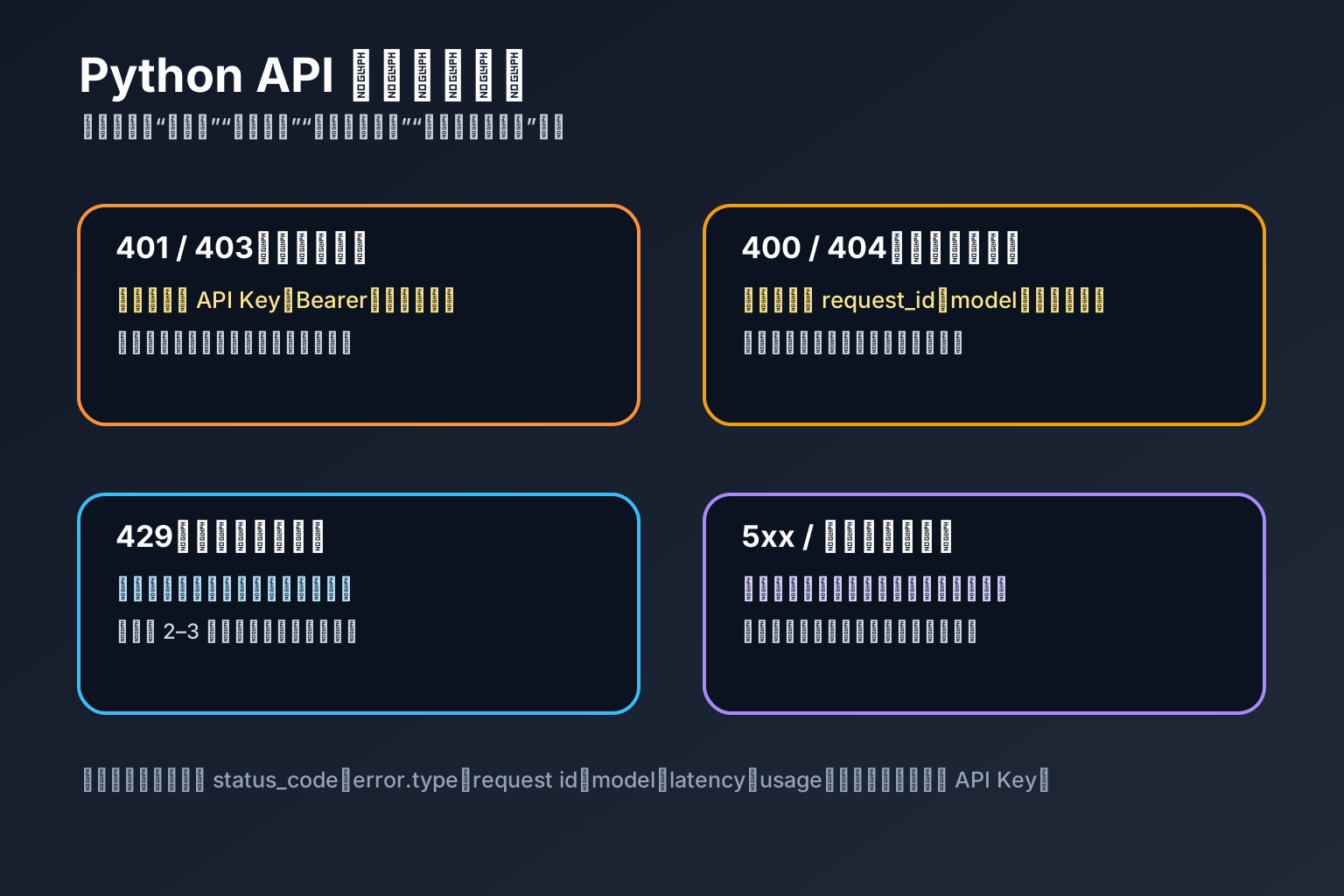
Start with a practical wrapper:
import os
from openai import OpenAI, APIConnectionError, APIStatusError, RateLimitError

client = OpenAI(
    api_key=os.environ["NBILITY_API_KEY"],
    base_url=os.getenv("NBILITY_BASE_URL", "https://api.nbility.dev/v1"),
    timeout=60,
    max_retries=2,
)


def safe_chat(prompt: str) -> str:
    try:
        response = client.chat.completions.create(
            model=os.getenv("NBILITY_MODEL", "gpt-4o"),
            messages=[{"role": "user", "content": prompt}],
            temperature=0.2,
            max_tokens=500,
        )
        return response.choices[0].message.content or ""
    except RateLimitError as exc:
        raise RuntimeError("Too many requests or quota pressure. Please retry later.") from exc
    except APIConnectionError as exc:
        raise RuntimeError("Could not connect to the API. Check network, Base URL, or proxy settings.") from exc
    except APIStatusError as exc:
        status = exc.status_code
        body = getattr(exc, "response", None)
        detail = body.text[:1000] if body is not None else str(exc)
        if status in {401, 403}:
            raise RuntimeError("Authentication failed: check API key, Bearer format, permissions, or balance.") from exc
        if status in {400, 404}:
            raise RuntimeError(f"Request parameters may be wrong: check model, messages, and max_tokens. Detail: {detail}") from exc
        if status >= 500:
            raise RuntimeError("Temporary upstream error. Retry later or switch models.") from exc
        raise RuntimeError(f"API request failed: HTTP {status}, {detail}") from exc
This wrapper does not silently swallow errors. Your application can show the user-friendly message to the user while writing technical details to logs.
Logging and Cost Control
An AI API integration is not finished just because it returns text. If multiple users, customer-service bots, or automated Agents will use it, log these fields from day one:
request_id: local request id
user_id: calling user or account
model: actual model name
stream: whether streaming was enabled
latency_ms: request duration
prompt_tokens / completion_tokens / total_tokens: token usage
status: success / failed
type: error type or HTTP status
If the response contains usage, store it in logs or a database. That is how you answer practical questions later: who used the API, which feature used it, and why cost suddenly increased.
Nbility fits well as the unified entry point here. Text models, image models, model switching, and cost observation can be managed centrally, while your code keeps the OpenAI-compatible shape.
Common Issues
1. 401 Unauthorized
Check these first:
Is the API key correct?
Did you include Authorization: Bearer?
Was .env loaded correctly?
Did server environment variables override local config?
Does the key have balance or permission?
2. 404 model not found
Usually the model name is wrong, or the account does not have access to that model. Confirm the available model name in Nbility, update NBILITY_MODEL, and rerun the minimal chat script.
3. Streaming produces nothing
Check three things:
Was stream=True actually passed?
Are you reading chunk.choices[0].delta.content?
Is a proxy, gateway, or web framework buffering the response?
Many web frameworks buffer responses by default, which makes streaming look broken. Verify that the backend really sends SSE or chunked responses to the browser.
4. When should I use sync vs streaming?
Use synchronous calls for background jobs, short answers, and structured processing. Use streaming for chat UIs, long answers, and mobile or group-chat bots. Streaming improves perceived latency; it does not necessarily reduce token cost.
Launch Checklist
[ ] API key never appears in code, frontend, logs, or screenshots
[ ] Base URL is https://api.nbility.dev/v1
[ ] Model name lives in environment variables
[ ] Every request has a timeout
[ ] 429 / 5xx use limited retries or queue backoff
[ ] 400 / 401 / 403 / 404 are not blindly retried
[ ] usage, latency, model, and user_id are logged
[ ] Streaming is visible in the target client and not buffered by the gateway
References
- Nbility API overview: https://nbility.dev/docs/api
- Nbility Chat Completions API: https://nbility.dev/docs/api/chat/completions
- OpenAI Chat Completions API reference: https://platform.openai.com/docs/api-reference/chat/create
- OpenAI Python SDK: https://github.com/openai/openai-python
- OpenAI Cookbook streaming example: https://github.com/openai/openai-cookbook/blob/main/examples/How_to_stream_completions.ipynb